> ## Documentation Index
> Fetch the complete documentation index at: https://opensource.weam.ai/docs/llms.txt
> Use this file to discover all available pages before exploring further.
# Prompts
Prompts in Weam AI are reusable conversation starters and templates that help users interact more efficiently with AI models.
They provide structured approaches to common tasks while ensuring consistency across team interactions.
## Understanding Prompts
Prompts are more than simple questions or instructions. In Weam AI, they're comprehensive templates that include:
* **Core Instructions**: The main task or question for the AI
* **Context Information**: Background details that improve AI responses
* **Output Formatting**: Specifications for how responses should be structured
* **Brand Alignment**: Integration with your company's voice and values
* **Template Variables**: Customizable placeholders for specific information
## Accessing Prompts
### From Brain Interface
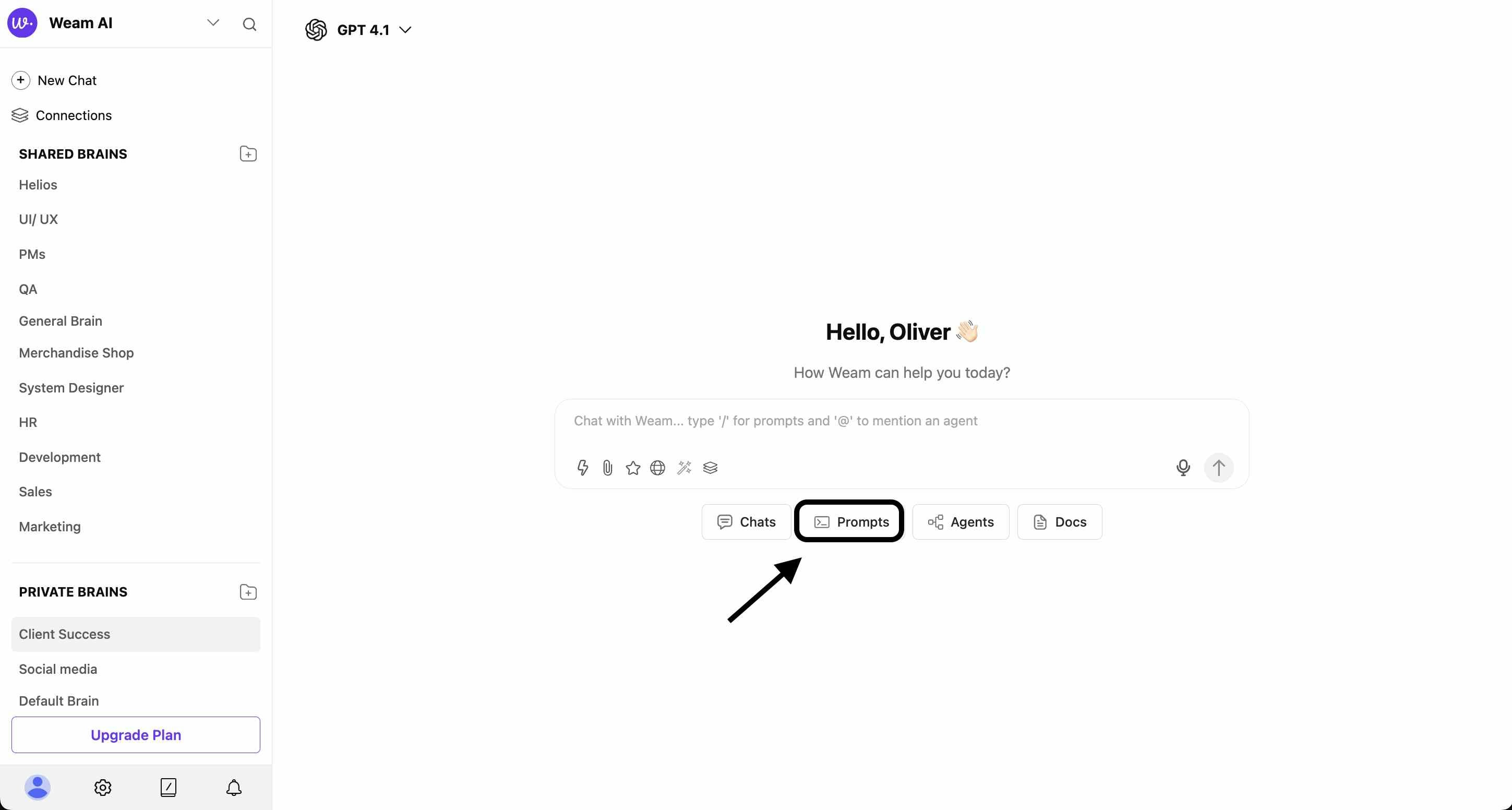
1. **Navigate to Prompts**: Click the "Prompts" button in the bottom navigation of any Brain
2. **Search Functionality**: Use the search bar to find specific prompts
 ### From Chat Interface
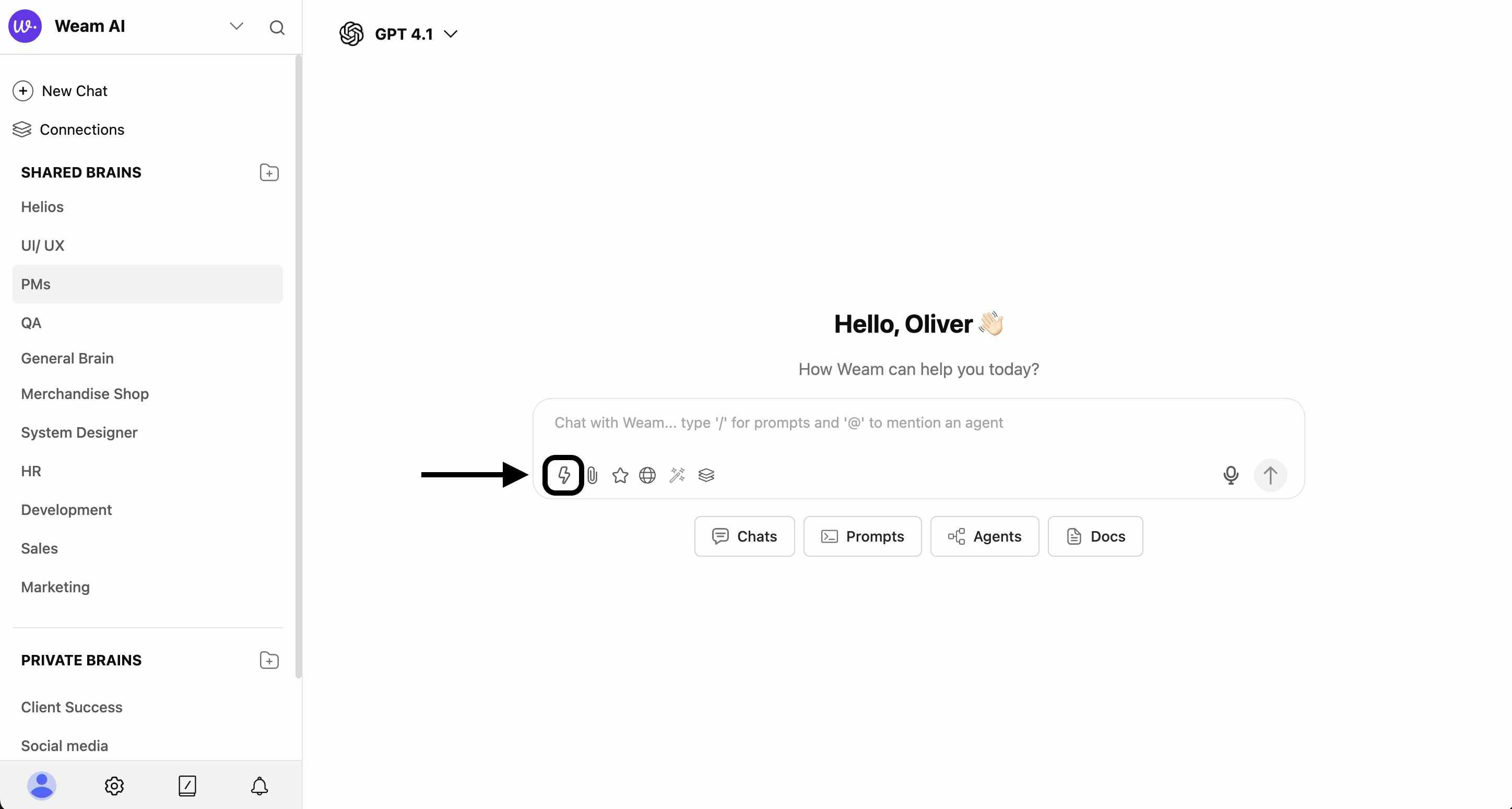
1. **Lightning Bolt Access**: Click the ⚡ icon in any chat input field
### From Chat Interface
1. **Lightning Bolt Access**: Click the ⚡ icon in any chat input field
 2. **Modal Selection**: Choose "Prompts" from the modal that appears
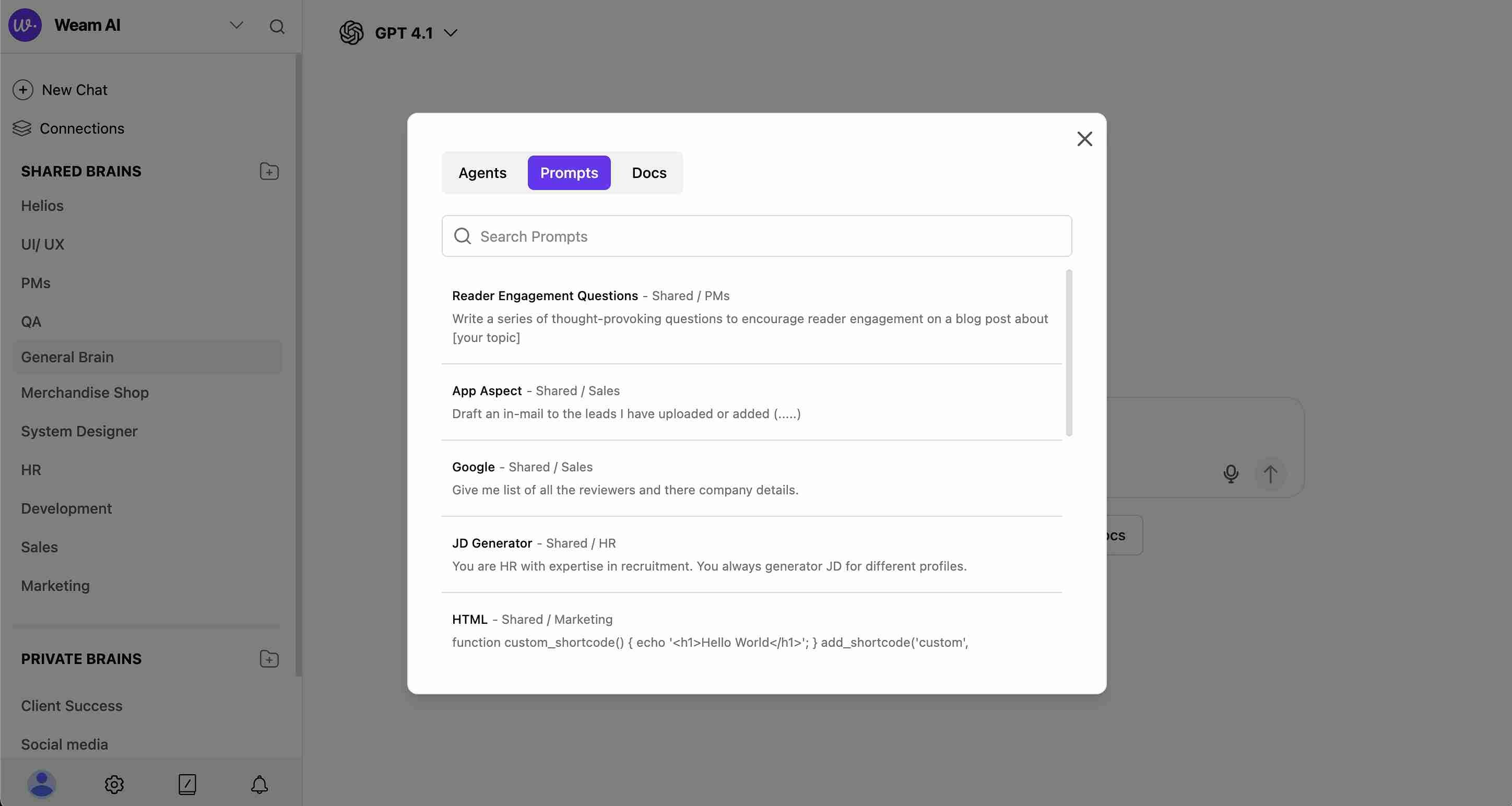 3. **Browse Available**: View prompts with their Brain associations (e.g., "Shared / PMs")
4. **Quick Search**: Find prompts quickly using the search function
## Prompt Management Interface
### Prompts Library Features
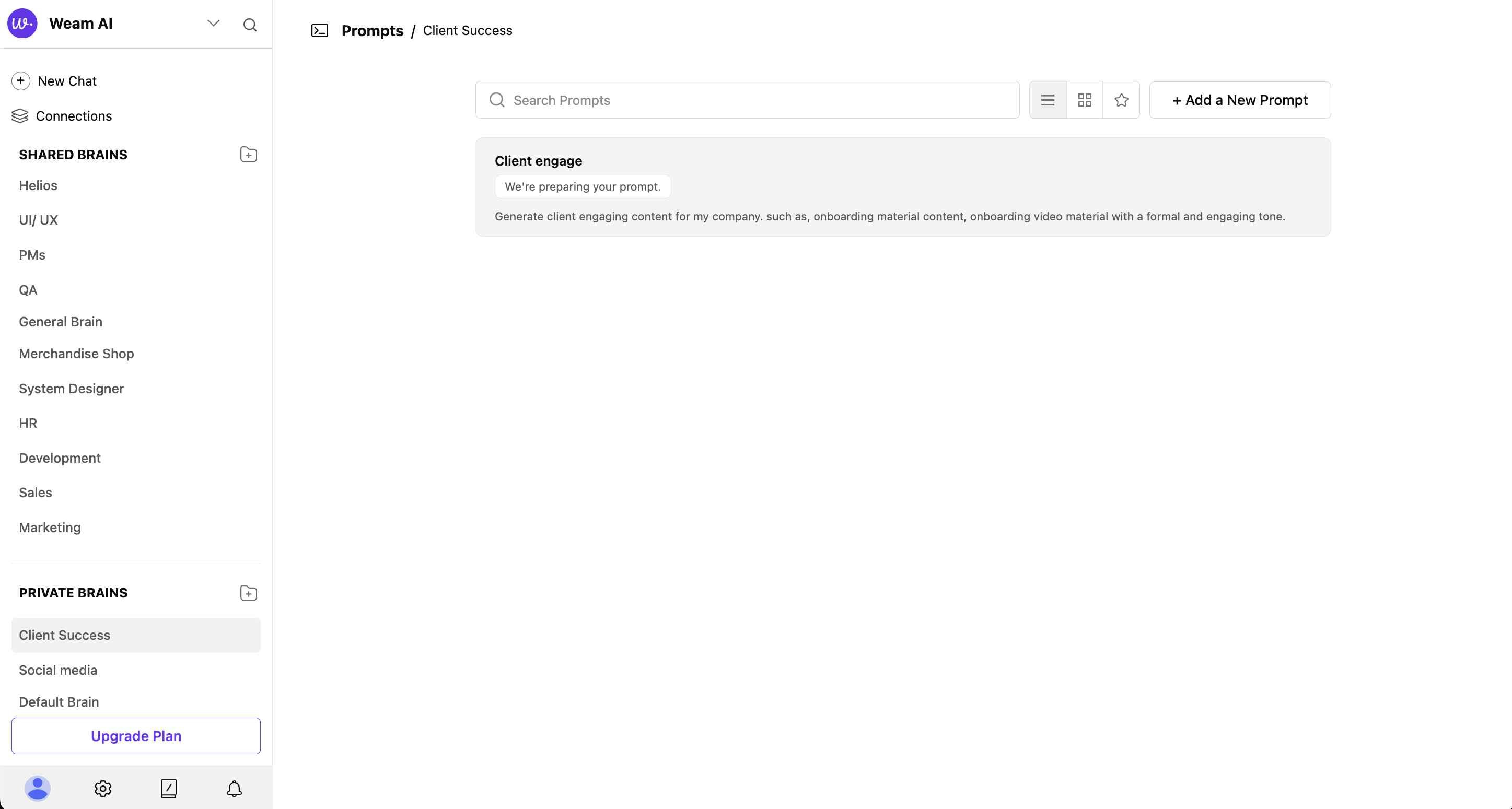
* **Search Bar**: Find specific prompts by name or content
* **View Options**: List view, grid view, and favorites view
* **Add New Prompt**: Create new prompts with the "+ Add a New Prompt" button
* **Prompt Cards**: Each prompt shows name, description, and source Brain
3. **Browse Available**: View prompts with their Brain associations (e.g., "Shared / PMs")
4. **Quick Search**: Find prompts quickly using the search function
## Prompt Management Interface
### Prompts Library Features
* **Search Bar**: Find specific prompts by name or content
* **View Options**: List view, grid view, and favorites view
* **Add New Prompt**: Create new prompts with the "+ Add a New Prompt" button
* **Prompt Cards**: Each prompt shows name, description, and source Brain
 ## Creating New Prompts
### Step 1: Access Creation Modal
1. Click "+ Add a New Prompt" from the Prompts library
2. The "New Prompt Template" modal will open
3. Option to "Add to Favorite" available immediately
## Creating New Prompts
### Step 1: Access Creation Modal
1. Click "+ Add a New Prompt" from the Prompts library
2. The "New Prompt Template" modal will open
3. Option to "Add to Favorite" available immediately
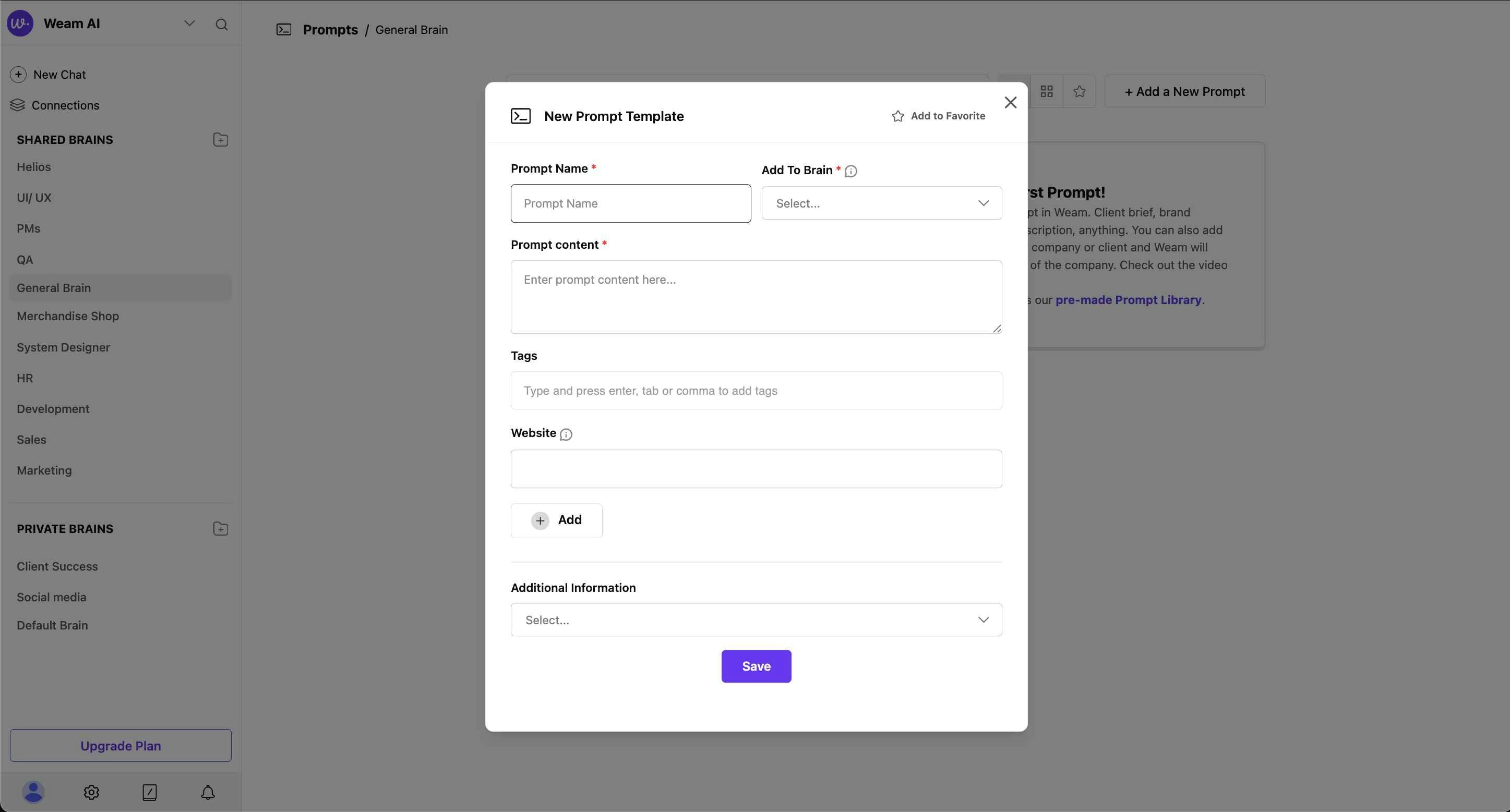 ### Step 2: Basic Information
**Required Fields:**
* **Prompt Name**: Enter a descriptive name for your prompt
* **Add To Brain**: Select which Brain to save the prompt to (dropdown selection)
* **Prompt Content**: Write your main prompt text in the large text area
**Optional Fields:**
* **Tags**: Add relevant tags for categorization and search
* **Website**: Include relevant website URL if applicable
### Step 3: Enhanced Template Options
**Additional Information Dropdown** offers three template types:
### Step 2: Basic Information
**Required Fields:**
* **Prompt Name**: Enter a descriptive name for your prompt
* **Add To Brain**: Select which Brain to save the prompt to (dropdown selection)
* **Prompt Content**: Write your main prompt text in the large text area
**Optional Fields:**
* **Tags**: Add relevant tags for categorization and search
* **Website**: Include relevant website URL if applicable
### Step 3: Enhanced Template Options
**Additional Information Dropdown** offers three template types:
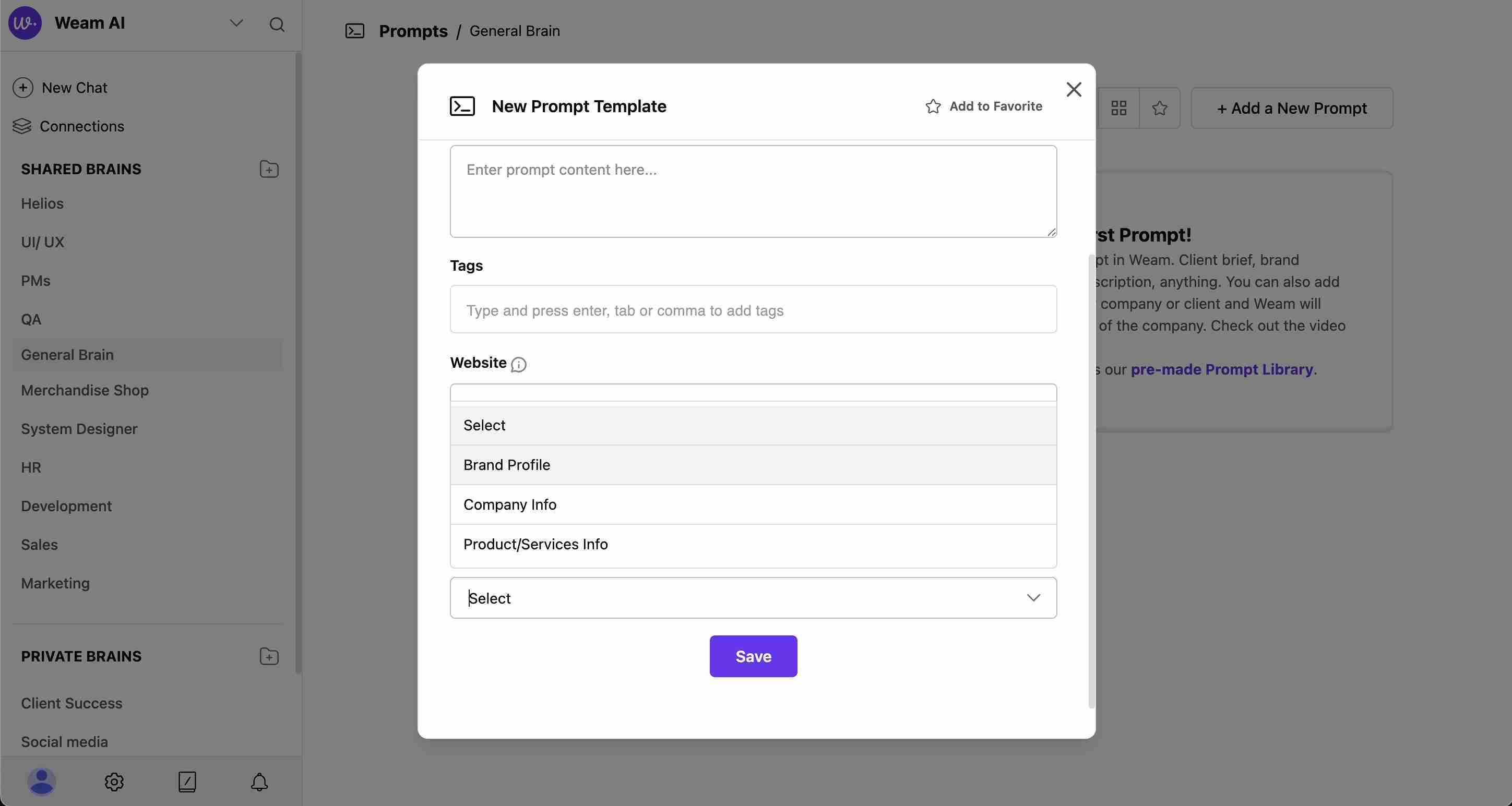 #### Brand Profile Template
When selected, provides fields for:
* **Brand Name**: Your brand identifier
* **Brand Slogan/Tagline**: Marketing tagline or slogan
* **Brand Mission**: Core mission statement
* **Brand Values**: Key brand values and principles
* **Target Audience**: Primary audience description
* **Industry**: Business sector or industry
#### Brand Profile Template
When selected, provides fields for:
* **Brand Name**: Your brand identifier
* **Brand Slogan/Tagline**: Marketing tagline or slogan
* **Brand Mission**: Core mission statement
* **Brand Values**: Key brand values and principles
* **Target Audience**: Primary audience description
* **Industry**: Business sector or industry
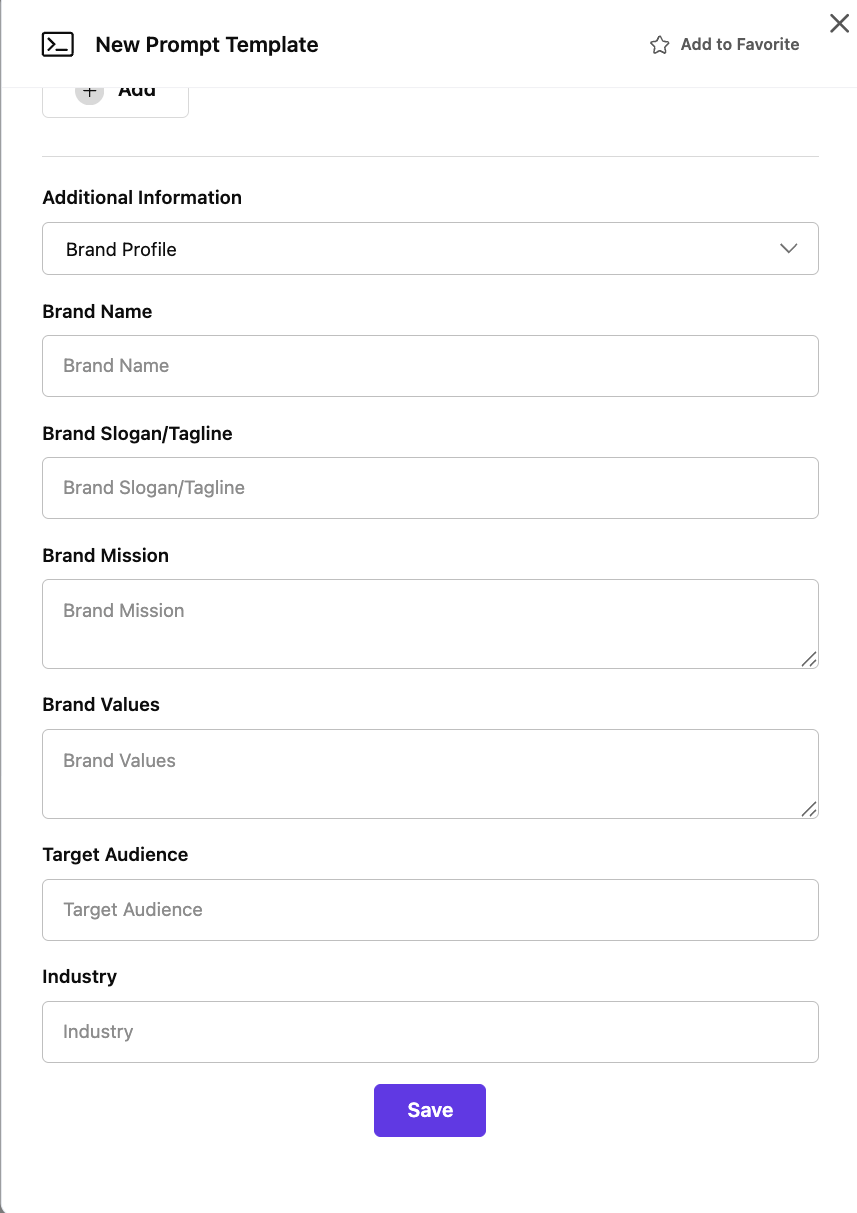 #### Company Info Template
When selected, provides fields for:
* **Company Name**: Official company name
* **Company Slogan/Tagline**: Corporate tagline
* **Company Mission**: Mission statement
* **Company Values**: Corporate values and principles
* **Company Overview**: General company description
* **Company Vision**: Vision statement
* **Industry**: Business sector
* **Headquarter**: Primary location information
#### Company Info Template
When selected, provides fields for:
* **Company Name**: Official company name
* **Company Slogan/Tagline**: Corporate tagline
* **Company Mission**: Mission statement
* **Company Values**: Corporate values and principles
* **Company Overview**: General company description
* **Company Vision**: Vision statement
* **Industry**: Business sector
* **Headquarter**: Primary location information
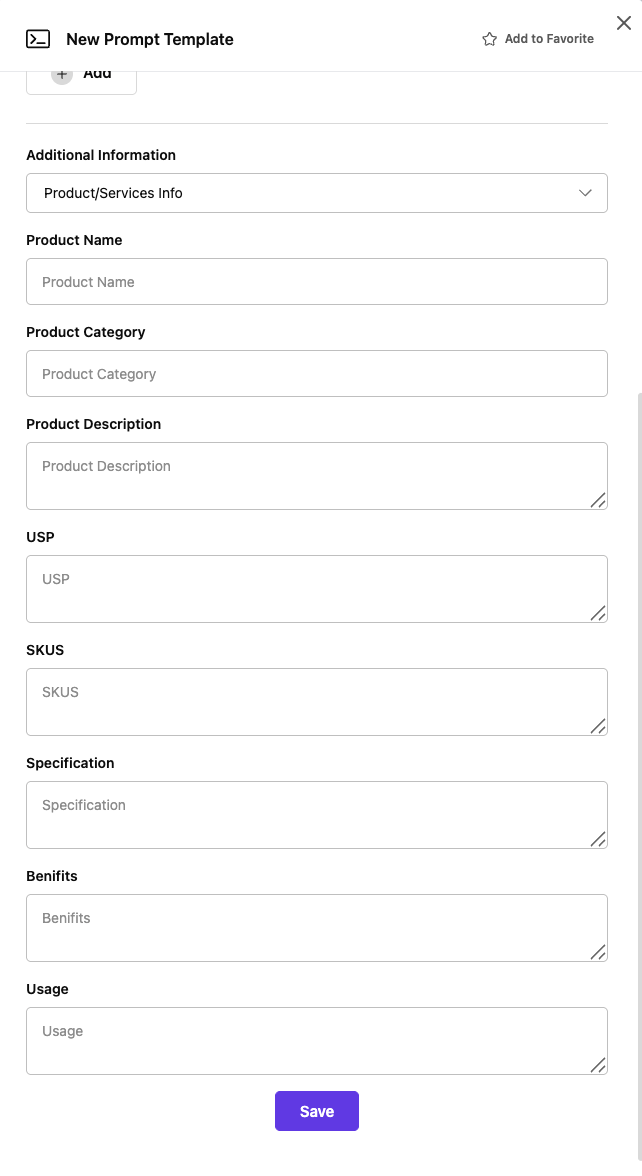
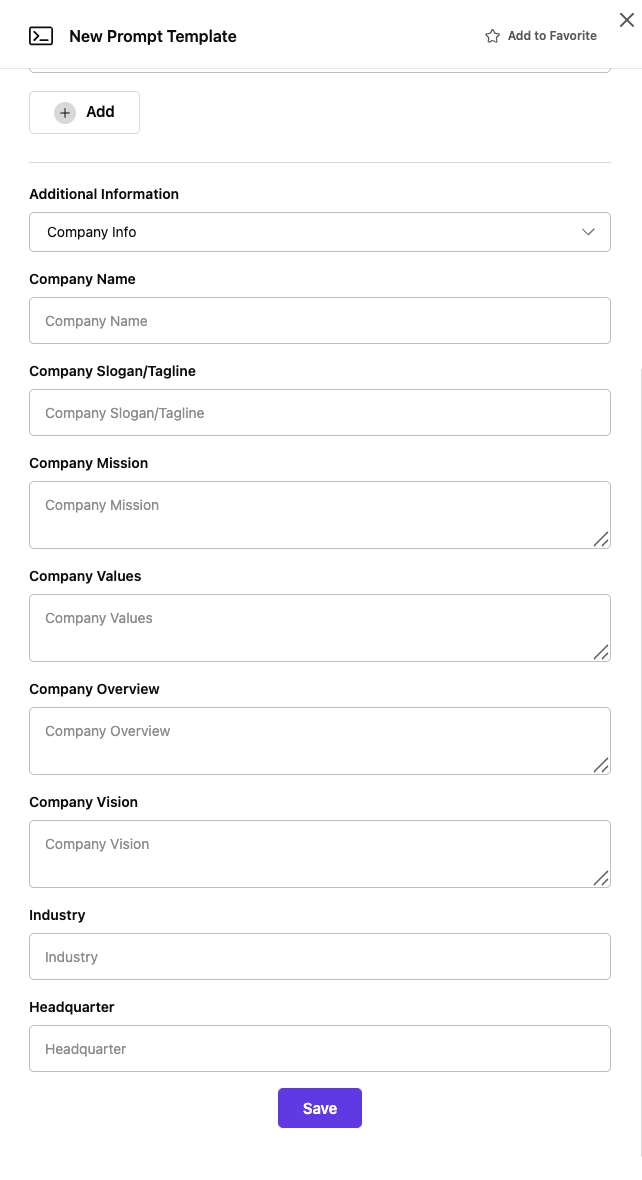 #### Product/Services Info Template
When selected, provides fields for:
* **Product Name**: Specific product identifier
* **Product Category**: Product classification
* **Product Description**: Detailed product information
* **USP**: Unique Selling Proposition
* **SKUS**: Stock Keeping Units or product codes
* **Specification**: Technical specifications
* **Benefits**: Key product benefits
* **Usage**: How the product is used
#### Product/Services Info Template
When selected, provides fields for:
* **Product Name**: Specific product identifier
* **Product Category**: Product classification
* **Product Description**: Detailed product information
* **USP**: Unique Selling Proposition
* **SKUS**: Stock Keeping Units or product codes
* **Specification**: Technical specifications
* **Benefits**: Key product benefits
* **Usage**: How the product is used
 ### Step 4: Save and Deploy
* **Save Button**: Complete prompt creation
* **Team Access**: Prompt becomes available to all team members
* **Brain Association**: Prompt appears in the selected Brain
## Using Prompts in Conversations
### Accessing from Chat
1. **Open Chat**: Start or continue any conversation
2. **Click Lightning Bolt**: Use the ⚡ icon in the chat toolbar
3. **Select Prompts**: Choose "Prompts" from the modal
4. **Browse and Select**: Find your desired prompt from the list
### Applying Prompts
1. **Select Prompt**: Click on the desired prompt from the list
2. **Auto-Population**: Prompt content fills the chat input field
3. **Customize Variables**: Replace placeholder text with specific information
4. **Send or Modify**: Use as-is or make adjustments before sending
## Advanced Prompt Features
### Power Prompt Enhancement
Power Prompt is Weam AI's intelligent prompt enhancement tool:
* **Automatic Enrichment**: Transforms basic instructions into detailed queries
* **Context Addition**: Adds relevant specifications and parameters
* **Intent Understanding**: Recognizes what you want to accomplish
* **One-Click Enhancement**: Simple activation for immediate improvement
### Step 4: Save and Deploy
* **Save Button**: Complete prompt creation
* **Team Access**: Prompt becomes available to all team members
* **Brain Association**: Prompt appears in the selected Brain
## Using Prompts in Conversations
### Accessing from Chat
1. **Open Chat**: Start or continue any conversation
2. **Click Lightning Bolt**: Use the ⚡ icon in the chat toolbar
3. **Select Prompts**: Choose "Prompts" from the modal
4. **Browse and Select**: Find your desired prompt from the list
### Applying Prompts
1. **Select Prompt**: Click on the desired prompt from the list
2. **Auto-Population**: Prompt content fills the chat input field
3. **Customize Variables**: Replace placeholder text with specific information
4. **Send or Modify**: Use as-is or make adjustments before sending
## Advanced Prompt Features
### Power Prompt Enhancement
Power Prompt is Weam AI's intelligent prompt enhancement tool:
* **Automatic Enrichment**: Transforms basic instructions into detailed queries
* **Context Addition**: Adds relevant specifications and parameters
* **Intent Understanding**: Recognizes what you want to accomplish
* **One-Click Enhancement**: Simple activation for immediate improvement
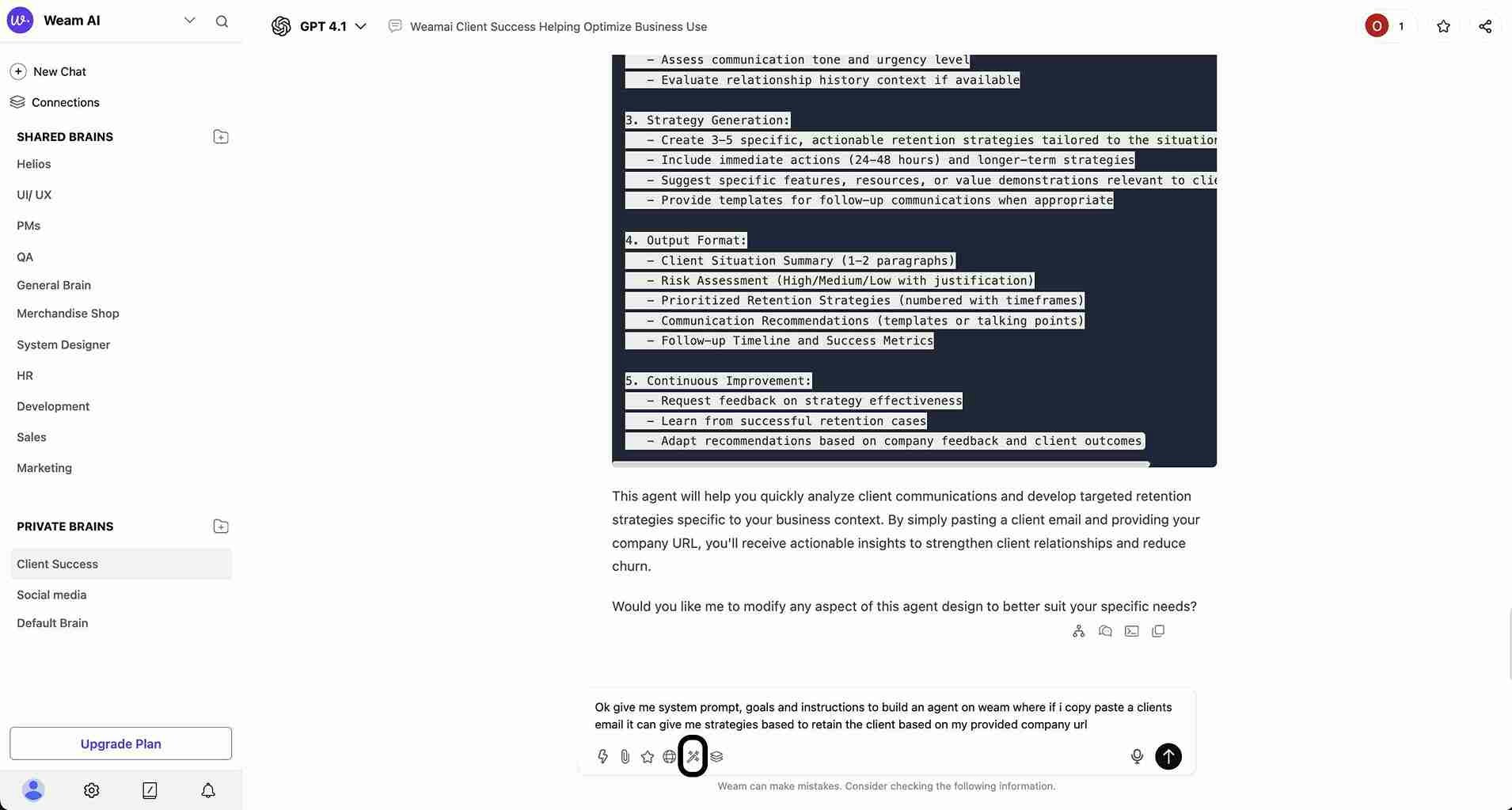 Power Prompt can generate comprehensive, structured responses like detailed client retention strategies:
 ### Document Integration
Enhance prompts with supporting materials:
* **File Upload**: Add relevant documents directly to prompts
* **Reference Materials**: Include guidelines, specifications, or data
* **Comprehensive Context**: Provide AI with complete information
* **Consistent Results**: Ensure uniform outputs across team usage
### Favorites System
* **Star Important Prompts**: Mark frequently used prompts as favorites
* **Quick Access**: Dedicated favorites view for rapid prompt selection
* **Personal Organization**: Individual favorite selections per user
* **Team Visibility**: See which prompts are popular across the team
## Prompt Library Categories
### Document Integration
Enhance prompts with supporting materials:
* **File Upload**: Add relevant documents directly to prompts
* **Reference Materials**: Include guidelines, specifications, or data
* **Comprehensive Context**: Provide AI with complete information
* **Consistent Results**: Ensure uniform outputs across team usage
### Favorites System
* **Star Important Prompts**: Mark frequently used prompts as favorites
* **Quick Access**: Dedicated favorites view for rapid prompt selection
* **Personal Organization**: Individual favorite selections per user
* **Team Visibility**: See which prompts are popular across the team
## Prompt Library Categories
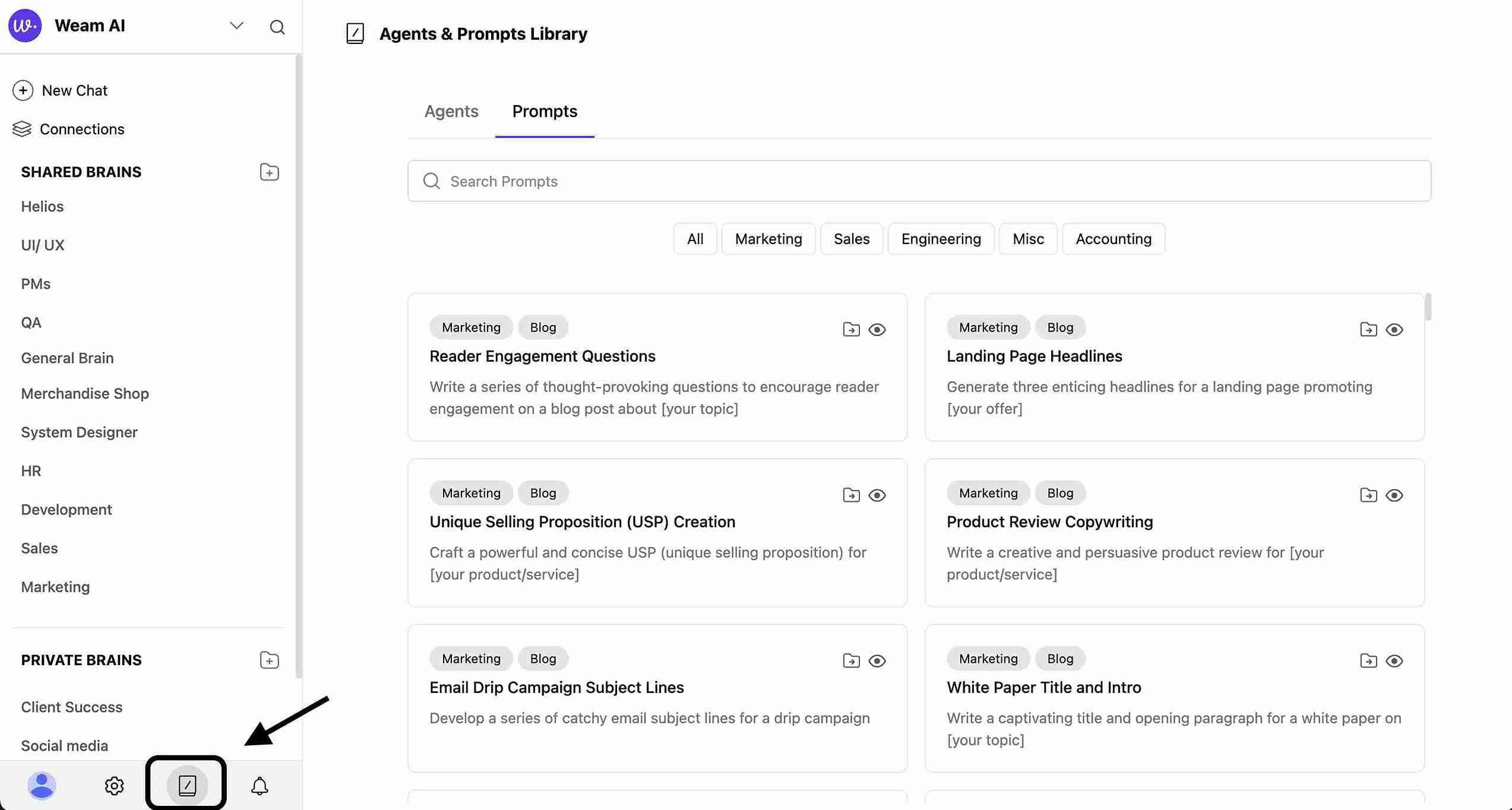 Weam AI includes ready-to-use templates across multiple business functions:
### Marketing Prompts
* **Content Creation**: Blog posts, social media content, marketing copy
* **Campaign Planning**: Marketing strategy development and campaign ideas
* **Social Media**: Platform-specific content and engagement strategies
* **Brand Messaging**: Consistent brand voice and messaging development
### Sales Prompts
* **Prospecting**: Lead generation and qualification templates
* **Follow-ups**: Sales follow-up sequences and communication templates
* **Proposal Writing**: Professional proposal and pitch templates
* **Objection Handling**: Responses to common sales objections
### Development Prompts
* **Code Review**: Code analysis and improvement suggestions
* **Documentation**: Technical documentation and user guide templates
* **Debugging**: Troubleshooting and problem-solving approaches
* **Testing**: Quality assurance and testing procedure templates
### Customer Success Prompts
* **Support Responses**: Customer service and support templates
* **Onboarding**: New customer onboarding sequences
* **Troubleshooting**: Problem resolution and support guides
* **Feedback Collection**: Customer feedback and satisfaction surveys
### HR Prompts
* **Job Descriptions**: Role specifications and requirements
* **Interview Questions**: Structured interview processes
* **Policy Creation**: HR policy and procedure development
* **Performance Reviews**: Employee evaluation and feedback templates
### Financial Prompts
* **Financial Analysis**: Financial reporting and analysis templates
* **Reporting**: Regular financial and business reporting formats
* **Compliance**: Regulatory compliance and audit preparation
* **Budget Planning**: Financial planning and budget development
Read more about [Prompt Library](/account/library/prompts)
Weam AI includes ready-to-use templates across multiple business functions:
### Marketing Prompts
* **Content Creation**: Blog posts, social media content, marketing copy
* **Campaign Planning**: Marketing strategy development and campaign ideas
* **Social Media**: Platform-specific content and engagement strategies
* **Brand Messaging**: Consistent brand voice and messaging development
### Sales Prompts
* **Prospecting**: Lead generation and qualification templates
* **Follow-ups**: Sales follow-up sequences and communication templates
* **Proposal Writing**: Professional proposal and pitch templates
* **Objection Handling**: Responses to common sales objections
### Development Prompts
* **Code Review**: Code analysis and improvement suggestions
* **Documentation**: Technical documentation and user guide templates
* **Debugging**: Troubleshooting and problem-solving approaches
* **Testing**: Quality assurance and testing procedure templates
### Customer Success Prompts
* **Support Responses**: Customer service and support templates
* **Onboarding**: New customer onboarding sequences
* **Troubleshooting**: Problem resolution and support guides
* **Feedback Collection**: Customer feedback and satisfaction surveys
### HR Prompts
* **Job Descriptions**: Role specifications and requirements
* **Interview Questions**: Structured interview processes
* **Policy Creation**: HR policy and procedure development
* **Performance Reviews**: Employee evaluation and feedback templates
### Financial Prompts
* **Financial Analysis**: Financial reporting and analysis templates
* **Reporting**: Regular financial and business reporting formats
* **Compliance**: Regulatory compliance and audit preparation
* **Budget Planning**: Financial planning and budget development
Read more about [Prompt Library](/account/library/prompts)