> ## Documentation Index
> Fetch the complete documentation index at: https://opensource.weam.ai/docs/llms.txt
> Use this file to discover all available pages before exploring further.
# Generating a Google Gemini API Key
Access Google's powerful Gemini AI models for multimodal capabilities including text generation, image analysis, and large document processing.
## Step-by-Step Guide
### Step 1: Search for Gemini API
Go to [google.com](https://www.google.com) and search for **"Gemini API key"**.
 **Alternative Direct Access:**
* Go directly to [ai.google.dev](https://ai.google.dev)
* Visit [aistudio.google.com](https://aistudio.google.com)
### Step 2: Access Google AI Studio
Click on the **"Google AI Studio API Key"** link in search results to open the Google AI for Developers page.
### Step 3: Get Your API Key
Click the blue **"Get an API key"** button to start the process.
**Alternative Direct Access:**
* Go directly to [ai.google.dev](https://ai.google.dev)
* Visit [aistudio.google.com](https://aistudio.google.com)
### Step 2: Access Google AI Studio
Click on the **"Google AI Studio API Key"** link in search results to open the Google AI for Developers page.
### Step 3: Get Your API Key
Click the blue **"Get an API key"** button to start the process.
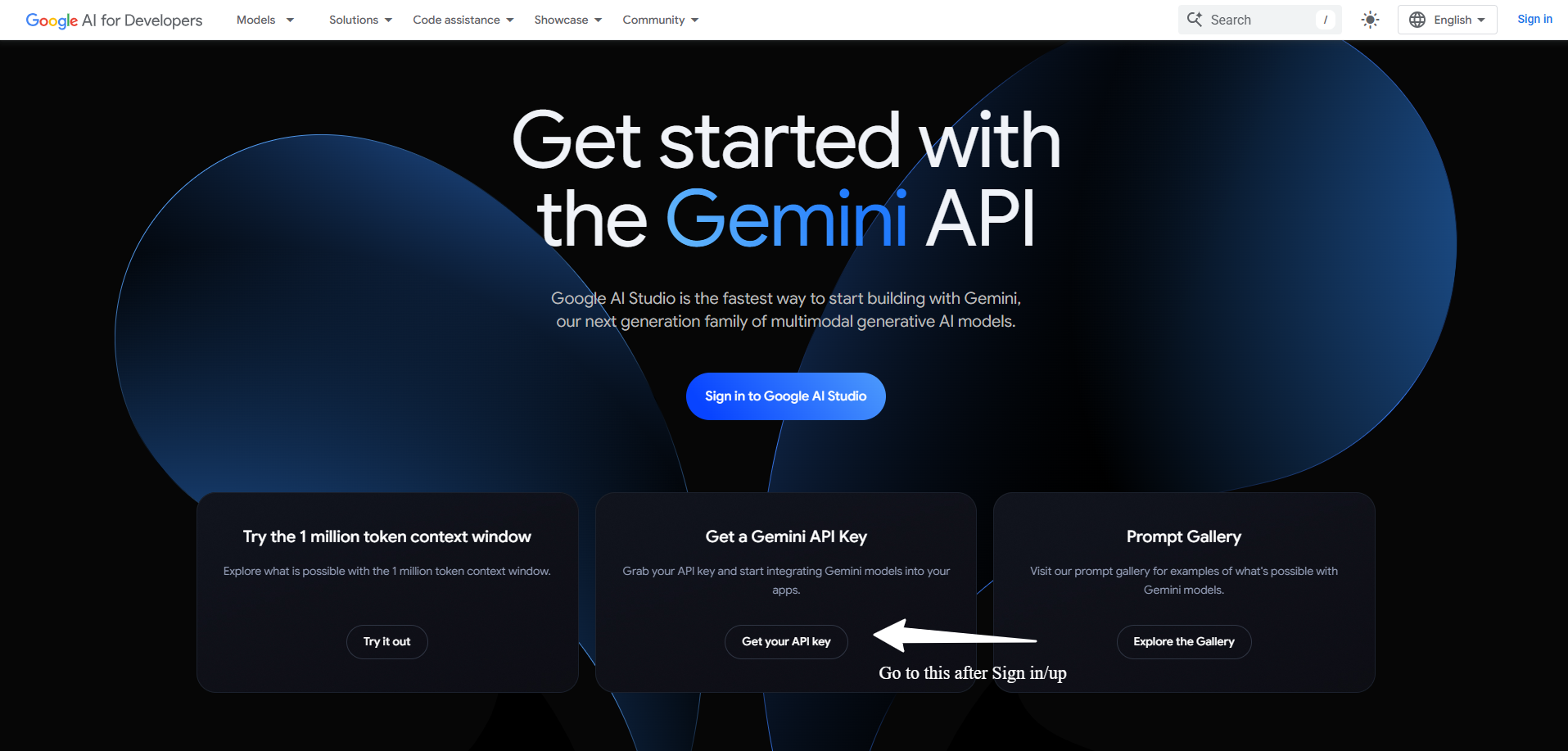 ### Step 4: Sign In to Google
**Existing User:**
* Sign in with your Google account credentials
* Use any Gmail, Google Workspace, or personal Google account
**New User:**
* Create a new Google account if needed
* Complete email verification process
### Step 5: Accept Terms and Conditions
Review and accept the Google AI Terms of Service and usage policies for the Gemini API.
### Step 6: Access Key Management
Click **"Get API key"** again to proceed to the API key management interface.
### Step 4: Sign In to Google
**Existing User:**
* Sign in with your Google account credentials
* Use any Gmail, Google Workspace, or personal Google account
**New User:**
* Create a new Google account if needed
* Complete email verification process
### Step 5: Accept Terms and Conditions
Review and accept the Google AI Terms of Service and usage policies for the Gemini API.
### Step 6: Access Key Management
Click **"Get API key"** again to proceed to the API key management interface.
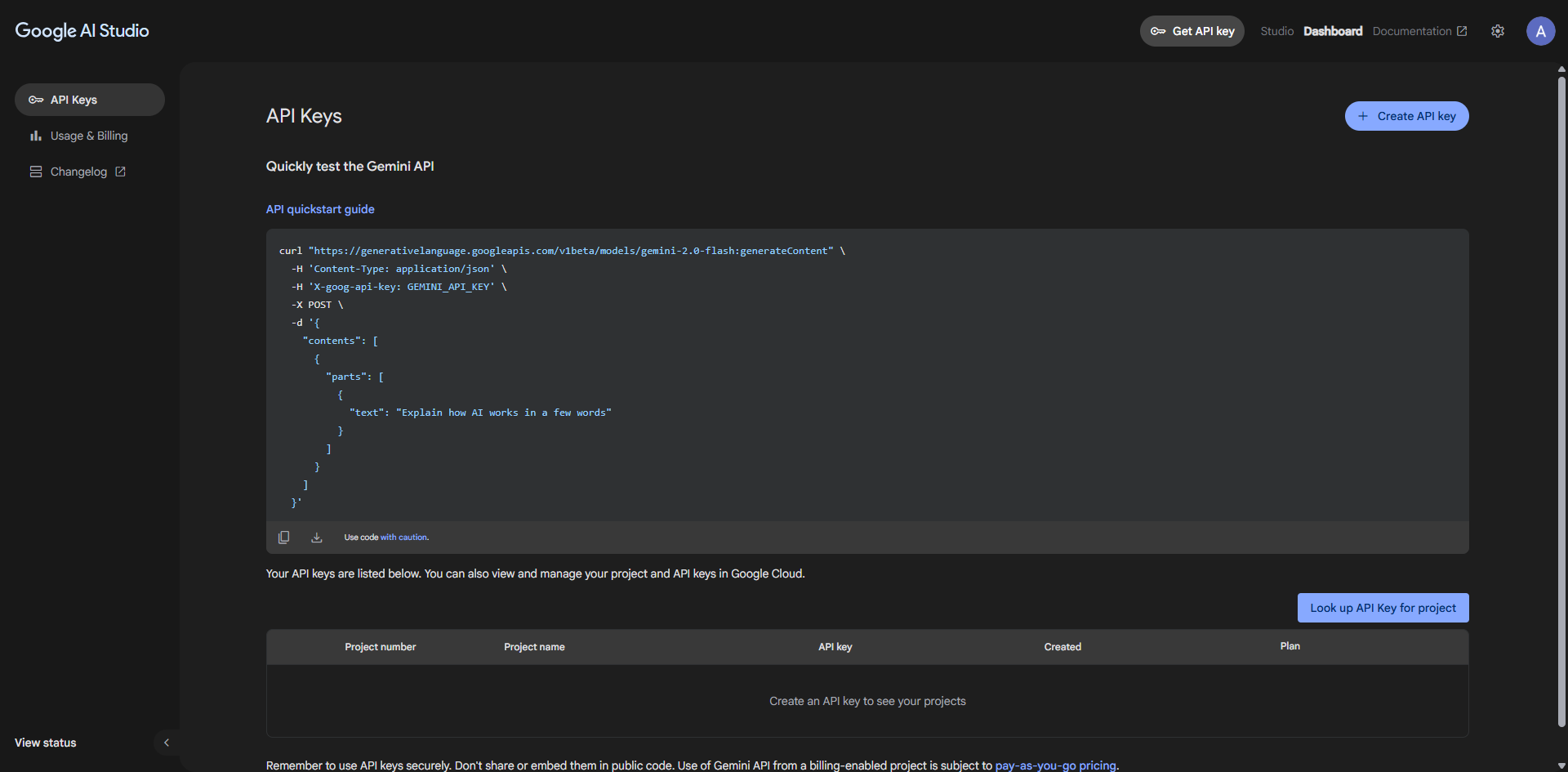 ### Step 7: Create New API Key
**If you have existing keys:** They will be displayed here **For new keys:** Click **"Create API key"** to generate a fresh key
### Step 8: Review Safety Guidelines
Read and accept the safety and security reminder about proper API key usage and protection.
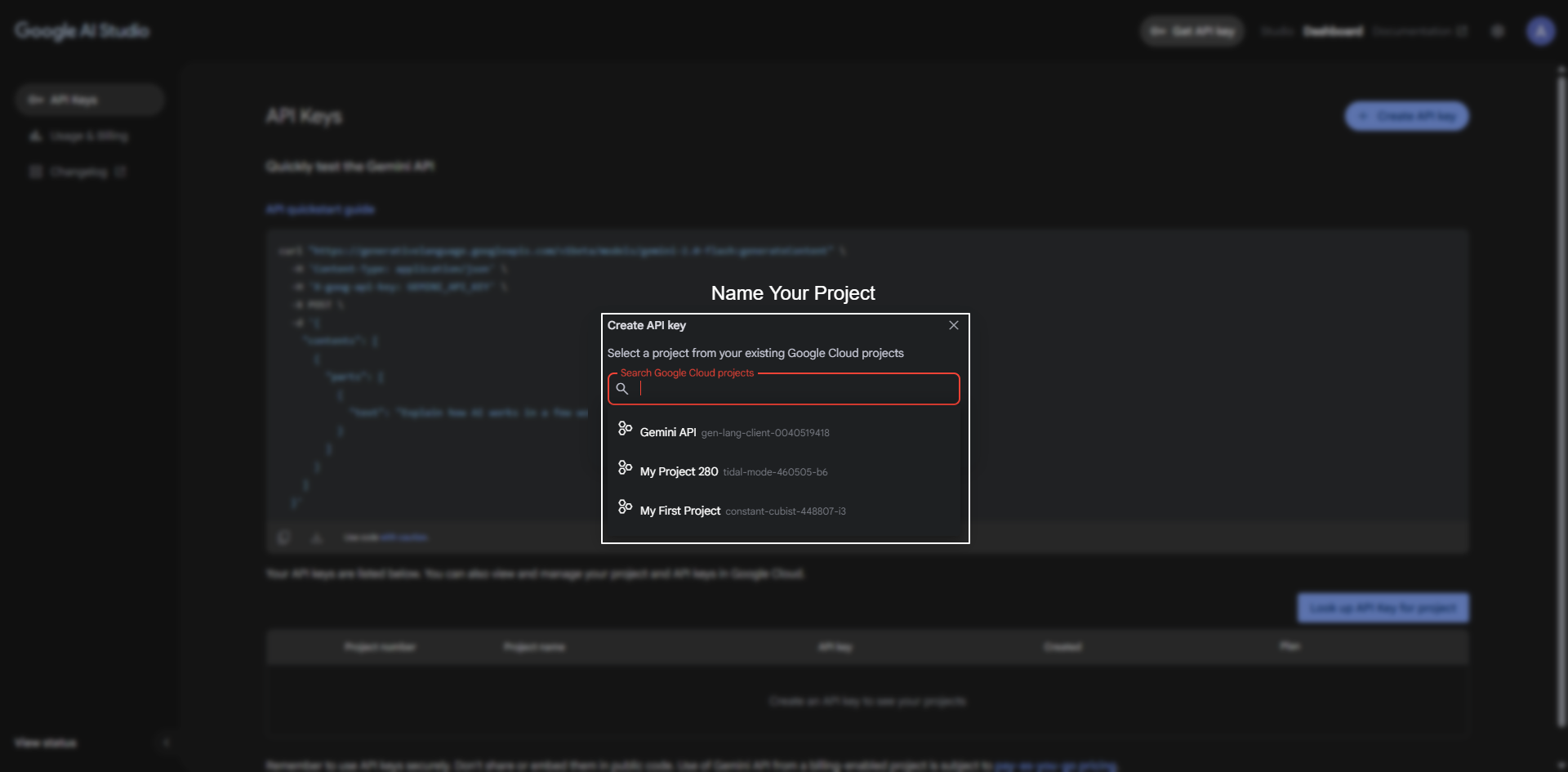
### Step 9: Choose Project Setup
Select your preferred option:
**Option A: Existing Project**
* Use an existing Google Cloud project if available
* Good for organizations with existing GCP setup
**Option B: New Project (Recommended)**
* Choose **"Create API key in new project"**
* Best for individual developers and new integrations
### Step 7: Create New API Key
**If you have existing keys:** They will be displayed here **For new keys:** Click **"Create API key"** to generate a fresh key
### Step 8: Review Safety Guidelines
Read and accept the safety and security reminder about proper API key usage and protection.
### Step 9: Choose Project Setup
Select your preferred option:
**Option A: Existing Project**
* Use an existing Google Cloud project if available
* Good for organizations with existing GCP setup
**Option B: New Project (Recommended)**
* Choose **"Create API key in new project"**
* Best for individual developers and new integrations
 ### Step 10: Secure Your API Key
1. **Copy immediately**: Your API key will be displayed - copy it now
2. **Store securely**: Save in password manager or secure environment
3. **Never share publicly**: Keep it private and confidential
4. **Monitor usage**: Check usage regularly in AI Studio dashboard
### Step 11: Add to Weam
Integrate your Gemini API key with Weam:
1. Open Weam and go to **Settings** → **Configurations**
2. Select **Gemini** as your provider
3. Paste your API key in the configuration field
4. Save and test with a multimodal prompt (text + image if available)
## Gemini Model Overview (2025)
### Available Models
| Model | Best For | Context Length | Speed | Capabilities |
| -------------------- | -------------------- | -------------- | -------- | -------------------------- |
| **Gemini 2.5 Pro** | Most advanced tasks | 1M tokens | Moderate | Experimental, cutting-edge |
| **Gemini 2.0 Flash** | Balanced performance | 1M tokens | Fast | Agent-driven applications |
| **Gemini 1.5 Pro** | Production workloads | 1M tokens | Moderate | Stable, reliable |
| **Gemini 1.5 Flash** | Quick responses | 1M tokens | Fastest | High-volume applications |
### Model Selection for Weam
**General Recommendations:**
* **Gemini 1.5 Flash**: Daily chat and quick tasks
* **Gemini 1.5 Pro**: Complex analysis and reasoning
* **Gemini 2.0 Flash**: Experimental features and agent workflows
* **Large Documents**: Any model (all support 1M token context)
## Multimodal Capabilities
### What Gemini Can Process
**Text Processing:**
* Natural language understanding and generation
* Code analysis and generation
* Document summarization and analysis
* Creative writing and content creation
**Image Capabilities:**
* Image analysis and description
* Visual question answering
* Image-based reasoning and analysis
* Generate and edit images programmatically (2.0 Flash)
**Large Context Processing:**
* Process documents up to 1 million tokens
* Handle extensive conversations and context
* Analyze large codebases and datasets
* Work with lengthy research papers and reports
**Structured Output:**
* Generate JSON, XML, and other structured formats
* Perfect for automation and integration workflows
* Consistent data extraction from unstructured content
## Free Tier and Pricing
### Free Tier Benefits
Google Gemini offers generous free access:
* **Quick setup**: Under 5 minutes to get started
* **No billing required**: Start immediately without payment setup
* **Sufficient volume**: Adequate for prototypes and personal projects
* **Rate limit handling**: Graceful degradation when limits are reached
### Free Tier Limits
* **Requests per minute**: Reasonable limits for development
* **Requests per day**: Sufficient for testing and small applications
* **Token limits**: Generous allowances for experimentation
### When to Upgrade
Consider paid plans for:
* **Production applications** with high volume
* **Commercial usage** beyond free tier limits
* **Priority support** and enhanced rate limits
* **Advanced features** and early access to new models
***
### Step 10: Secure Your API Key
1. **Copy immediately**: Your API key will be displayed - copy it now
2. **Store securely**: Save in password manager or secure environment
3. **Never share publicly**: Keep it private and confidential
4. **Monitor usage**: Check usage regularly in AI Studio dashboard
### Step 11: Add to Weam
Integrate your Gemini API key with Weam:
1. Open Weam and go to **Settings** → **Configurations**
2. Select **Gemini** as your provider
3. Paste your API key in the configuration field
4. Save and test with a multimodal prompt (text + image if available)
## Gemini Model Overview (2025)
### Available Models
| Model | Best For | Context Length | Speed | Capabilities |
| -------------------- | -------------------- | -------------- | -------- | -------------------------- |
| **Gemini 2.5 Pro** | Most advanced tasks | 1M tokens | Moderate | Experimental, cutting-edge |
| **Gemini 2.0 Flash** | Balanced performance | 1M tokens | Fast | Agent-driven applications |
| **Gemini 1.5 Pro** | Production workloads | 1M tokens | Moderate | Stable, reliable |
| **Gemini 1.5 Flash** | Quick responses | 1M tokens | Fastest | High-volume applications |
### Model Selection for Weam
**General Recommendations:**
* **Gemini 1.5 Flash**: Daily chat and quick tasks
* **Gemini 1.5 Pro**: Complex analysis and reasoning
* **Gemini 2.0 Flash**: Experimental features and agent workflows
* **Large Documents**: Any model (all support 1M token context)
## Multimodal Capabilities
### What Gemini Can Process
**Text Processing:**
* Natural language understanding and generation
* Code analysis and generation
* Document summarization and analysis
* Creative writing and content creation
**Image Capabilities:**
* Image analysis and description
* Visual question answering
* Image-based reasoning and analysis
* Generate and edit images programmatically (2.0 Flash)
**Large Context Processing:**
* Process documents up to 1 million tokens
* Handle extensive conversations and context
* Analyze large codebases and datasets
* Work with lengthy research papers and reports
**Structured Output:**
* Generate JSON, XML, and other structured formats
* Perfect for automation and integration workflows
* Consistent data extraction from unstructured content
## Free Tier and Pricing
### Free Tier Benefits
Google Gemini offers generous free access:
* **Quick setup**: Under 5 minutes to get started
* **No billing required**: Start immediately without payment setup
* **Sufficient volume**: Adequate for prototypes and personal projects
* **Rate limit handling**: Graceful degradation when limits are reached
### Free Tier Limits
* **Requests per minute**: Reasonable limits for development
* **Requests per day**: Sufficient for testing and small applications
* **Token limits**: Generous allowances for experimentation
### When to Upgrade
Consider paid plans for:
* **Production applications** with high volume
* **Commercial usage** beyond free tier limits
* **Priority support** and enhanced rate limits
* **Advanced features** and early access to new models
***